


HubSpot's built-in routing handles most support scenarios well. But when you need weighted scoring, external data lookups, or compliance audit trails, you'll need custom routing built with Data Hub workflows.
This guide comes from our experience delivering a 300-seat Service Hub rollout for a financial services company. It explains when native routing is enough, when it isn't, and how to approach custom routing systems that match enterprise requirements.
What Native Routing Actually Does
HubSpot Service Hub includes solid routing functionality out of the box. You can tag agents with skills like "Billing Expert" or "Technical Support" and route conversations to matching team members automatically. You can route based on channel, source inbox, status, or linked object data. And you can use associated object properties (ticket priority, company tier, contact lifecycle stage, revenue data) to inform routing decisions.
In practice, this works well for straightforward scenarios. A chat comes in tagged as "Database Connection Error" with a Technical category. HubSpot matches agents with the "Database Administration" skill, checks who's available, and assigns to the agent with the lightest workload.
Similarly, when a contact flagged as VIP from a company with £500k+ annual revenue submits an email, HubSpot filters to agents with the "VIP Handler" skill, creates a high-priority ticket, and assigns to an available senior agent.
When Native Routing Is Enough
Native routing works when your routing criteria match standard HubSpot properties, when all the data you need already lives in HubSpot, when skill-based assignment captures your requirements, when simple priority levels work for your business, and when all agents handle the same capacity, or the same capacity by channel based on experience.
Where Enterprise Organisations Hit the Limits
The problems start when routing decisions need to weigh multiple factors simultaneously: expertise match, current workload, customer history, SLA urgency, and time-zone alignment all at once.
They compound when you need real-time data from outside HubSpot: account status from billing systems, product usage data from analytics platforms, or contractual entitlements from external databases.
And they become acute when compliance enters the picture: data residency rules, certification requirements for certain issue types, or detailed audit trails of every routing decision.
One of our financial services clients needed routing that checked real-time account status via API, with different routing logic per specific user per channel (email, chat, form, and an external third-party system), plus a single place outside User Settings to manage availability with hierarchical permissions for who can edit which settings.
Native routing couldn't support this. Custom routing via Data Hub workflows was required.
How Custom Routing Works
Custom routing uses Data Hub workflows with custom-coded actions in Python or Node.js.
The flow: a new conversation or ticket triggers workflow enrolment. Criteria check that status is "New", no owner is assigned, and conversation type matches. A custom coded action then fetches additional context via APIs, applies routing logic, calculates optimal assignment, executes assignment via HubSpot API, and logs the decision. The agent receives the conversation with an audit comment showing exactly why this routing decision was made.
You'll need Data Hub Professional or Enterprise. Enterprise gives you higher execution limits, which matters for high-volume routing..
HubSpot Supports Rate Limits / Throttling
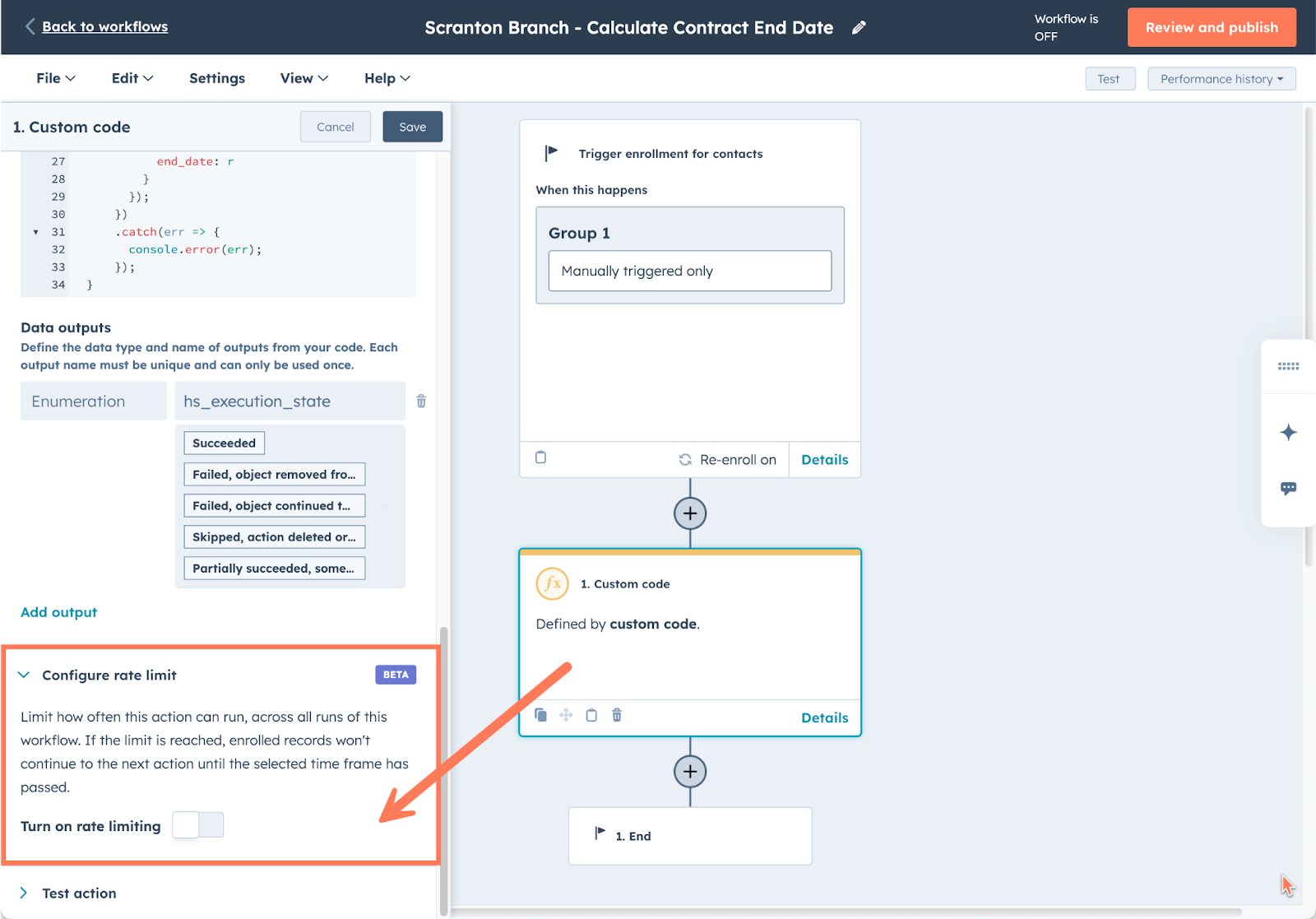
HubSpot's new rate limiting feature for custom code and webhook actions solves this elegantly. In the action settings, you'll find a "Configure rate limit" toggle. Enable it to control how often the action can run across all workflow executions. By throttling the action to process one conversation every ten seconds, you ensure each ticket is routed and the agent assignment is recorded before the next conversation is processed. The workflow action logs show exactly when an action has executed successfully and when it's been paused due to rate limiting, including when it will retry — useful for troubleshooting during rollout. It's a small configuration change that transforms unreliable parallel execution into predictable sequential routing.
Note that rate limiting on any action affects all subsequent actions in that workflow branch, so plan your workflow structure accordingly.
The Implementation Approach
Define Your Routing Logic First
Before touching code, document what factors influence routing. Customer attributes like tier, segment, geography, language preference, account value. Issue attributes like category, priority, complexity score, SLA requirements. Agent attributes like skill match, current capacity, availability status, performance metrics, certification level. Contextual factors like historical agent-customer relationships, time of day, team-level capacity, recent escalations.
Define what external data you need, what decision logic applies (weighted scoring, elimination criteria, preference rules), and what fallback logic kicks in when no ideal match exists.
Design the Data Flow
You'll work with HubSpot's Conversations API, Tickets API, Contacts API, Companies API, Owners API, User API and Timeline API. External APIs might include your customer account system (Xero, Sage, legacy SQL or Snowflake), product usage database, billing platform, or agent availability system like Aircall.

In HubSpot, create a conversation-based or ticket-based workflow. Set enrolment to trigger when a conversation is created, filtered to status "New", owner unknown, and conversation type matches your channels. Disable re-enrolment as this is one-time routing.
For the custom coded action, Python works better for data manipulation, scoring algorithms, and complex logic. Node.js works better for API integrations, faster execution, and JSON handling.
The custom-coded action fetches HubSpot data from contacts and companies, calls external APIs for enrichment, gets agent availability via the Owners API, applies your scoring algorithm, selects the optimal agent, updates the conversation owner, adds an audit comment, and triggers notifications. You might end up with Agent A at 95/100, Agent B at 78/100, Agent C at 62/100, with the highest-scoring agent getting the assignment.
Build Error Handling Into the Design
Things fail. External API failure should fall back to HubSpot-only routing using simplified criteria. No available agents should route to an overflow queue or escalate to a supervisor. Unexpected errors should assign to a default owner and flag for manual review. Log everything for monitoring.
Test in Phases
Unit test individual functions. Integration test with sample data across VIP scenarios, standard scenarios, edge cases, and various conversation types. Pilot with one team or channel, monitoring 100% of routing decisions and gathering agent feedback. Then roll out gradually: 25% in week one, 50% in week two, 75% in week three, 100% in week four.
Adding Transparency with Audit Trails
One powerful capability is automatic routing explanation comments added to conversation threads using the Conversation V3 API.
Agents and supervisors see a system comment on the conversation timeline showing the assigned agent, routing score, timestamp, and the factors that drove the decision: VIP customer status, skill match, certification, capacity, previous relationship with the customer, and which alternative agents were considered.
This means supervisors understand routing decisions, agents see context for their assignments, compliance teams have audit history, and manual overrides are informed by data.
What to Monitor
Track routing accuracy: percentage of conversations requiring manual reassignment, average routing score, customer satisfaction correlation. Track agent utilisation: workload distribution, capacity rates, peak vs off-peak balancing. Track system performance: average routing execution time, external API success rates, fallback trigger frequency, error rates by type. Track business impact: first response time improvement, resolution time by agent, satisfaction trends, SLA compliance.
Common Challenges
External API latency slowing routing: Set timeouts with fallback (2-second timeout, use cached data if it fails). Or assign immediately using HubSpot data, fetch external data asynchronously, and re-route if external data suggests a better match. Or pre-fetch and cache: sync external data to HubSpot properties on a schedule so routing uses cached properties instantly.
Uneven agent workloads: Weight current workload more heavily in capacity scoring. Implement team-level balancing rules. Monitor utilisation dashboards. Review agent skill assignments periodically.
Routing logic becoming unmaintainable: Document all factors and weights. Version control logic changes. Use modular scoring functions. Review logic with stakeholders regularly.
When Custom Routing Makes Sense
Custom routing is worth the investment when you need multi-factor routing with weighted scoring, external data lookups (billing, product usage, entitlements), channel-specific capacity management, compliance requirements with audit trails, complex business rules beyond native capabilities, or integration with external availability systems like Aircall.
If your routing needs are simpler, native Service Hub routing will serve you well.
FAQs
What can HubSpot's native routing do? Native routing assigns conversations based on agent skills, conversation properties (channel, source, status), and associated object properties like ticket priority or company tier. It works well when all your data lives in HubSpot and skill-based matching meets your needs.
When do I need custom routing instead of native HubSpot routing? You need custom routing when you require weighted scoring across multiple factors, external API lookups (billing systems, usage data), channel-specific capacity limits, compliance audit trails, or complex business logic that native routing can't handle.
What HubSpot subscription do I need for custom routing? Data Hub Professional or Enterprise. Enterprise provides higher execution limits, which matters for high-volume routing scenarios.
How does custom routing scoring work? Custom routing calculates a weighted score for each available agent based on factors you define. Skill match might count for 40%, customer tier for 30%, current capacity for 20%, and account status for 10%. The highest-scoring agent gets the assignment.
Can I add audit trails to routing decisions in HubSpot? Yes. Using the Timeline API, custom routing can add comments to conversation threads explaining exactly why each routing decision was made: which agent was selected, their score, and the factors that drove the decision.
What happens if custom routing fails? Well-built custom routing includes fallback logic: simplified HubSpot-only routing if external APIs fail, overflow queues if no agents are available, and default owner assignment as a last resort. All errors should be logged for monitoring.
How long does custom routing implementation take? Implementation typically follows a phased approach: requirements documentation, development, pilot testing with one team, then gradual rollout over 3-4 weeks with ongoing monitoring and optimisation.
How do I prevent multiple simultaneous conversations being assigned to the same agent? Use HubSpot's rate limiting feature on your custom code action. This throttles execution so conversations are processed sequentially rather than in parallel, ensuring each assignment is recorded before the next conversation is routed. Available in Operations Hub Professional and Enterprise.













.svg)
.svg)