

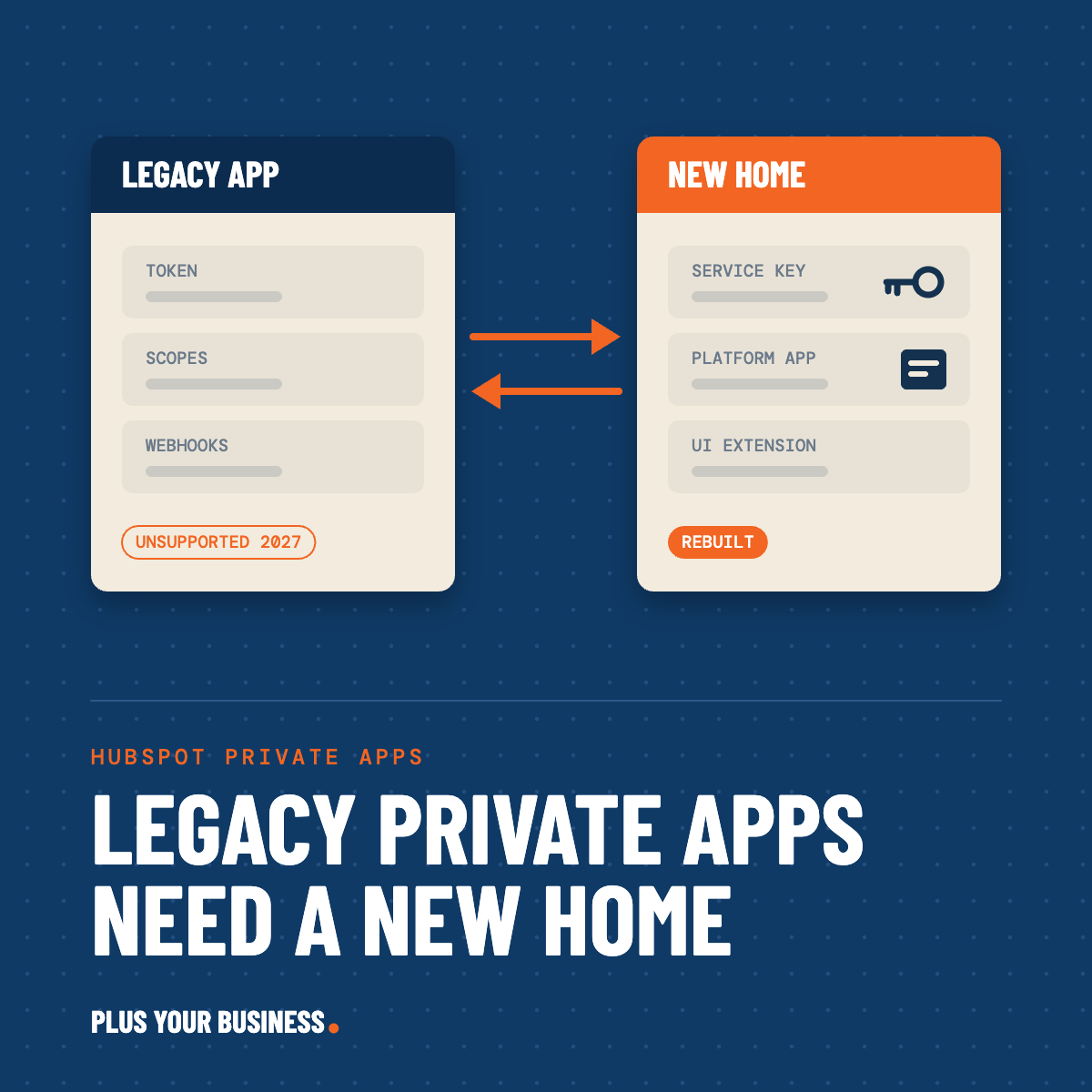
Yes, you need to act, but you have time to do it properly. From 26 October 2026 you can no longer create a legacy private app in an existing HubSpot account, and from September 2027 the ones you already have are unsupported. Every legacy private app needs a replacement within the next 11 months: a Service Key if it only calls the API, or an app on HubSpot's developer platform if it uses webhooks or shows anything inside the HubSpot UI. Nothing breaks this month. What catches people out is that the replacement is a rebuild, not a button.
The problem: HubSpot put a date on every private app in your portal
If you have connected anything to HubSpot since API keys were retired in 2022, there is a good chance it runs on a private app. A BI connector, a nightly export to a warehouse like Snowflake, a middleware sync to your ERP, a custom-coded workflow action that calls back into HubSpot, a webhook listener that tells another system when a deal closes. Each one was created in Settings, given scopes, and handed a token. For four years that was the sanctioned way to do it.
In September 2026 HubSpot announced three things on one enforcement date, September 2027: the v1, v2 and v3 API versions go unsupported, legacy public apps go unsupported, and legacy private apps go unsupported. Unsupported means no bug fixes, no reliability work and no security updates. The apps may keep running, but HubSpot will not stand behind them.
Two earlier dates sit inside that window and cause the real problems. Legacy private app creation was switched off for new HubSpot accounts on 28 September 2026 and switches off for existing accounts on 26 October 2026. Support for the v4 APIs ends separately on 30 March 2027.
| Date | What happens |
|---|---|
| 15 Sep 2026 | Fall Spotlight announcement; 12-month migration window opens |
| 28 Sep 2026 | Legacy private app creation ends for new HubSpot accounts |
| 26 Oct 2026 | Legacy private app creation ends for existing HubSpot accounts |
| 30 Mar 2027 | v4 APIs unsupported |
| Sep 2027 | Legacy private apps, legacy public apps and v1 to v3 APIs unsupported |
The creation cut-off for existing accounts is the only date inside the next month; everything else is 2027, which is why the inventory can be calm but should not be slow.
Why this catches people out: most private apps were set up once by whoever needed them and never looked at again. Nobody has a list. Some of them belong to people who have left. And the announcement went out through the developer changelog and Community, which the admins who actually own these tokens rarely read.
What is possible: two replacements, and the split is clean
HubSpot has not left a gap. It has split what a legacy private app used to do into two things, and the split is by what the integration does, not by how big it is.
Service Keys are account-level API credentials. You create one in Settings, give it scopes, and use it as a bearer token. That covers the majority of private apps in most portals: BI tools, warehouse syncs, scheduled scripts, middleware that polls HubSpot and writes back. They came out of beta at the end of September 2026 and HubSpot names them as the direct replacement for legacy private apps that only make API calls.
Developer platform apps (what HubSpot calls project-based apps) are for anything that needs HubSpot to call you, or that lives inside the HubSpot UI. Webhook subscriptions, app cards on a record, app pages, custom workflow actions, serverless functions. These are defined as code, uploaded with HubSpot's CLI, and versioned against a dated platform release. The current version is 2026.09.
So the question for each private app is not "how do I migrate this" but "which of the two does this one need". For a data-only app the answer is a Service Key and the move is a credential swap. For an app with webhooks or a UI the answer is a rebuild as a platform app, which is a small development project rather than a settings change.
How it works at a high level
The work has three parts: an inventory, a decision per app, and a cutover per app. The inventory is the part people skip, and it is the part that decides how long the rest takes.
Inventory. For every legacy private app in the portal: what it does, which external system holds its token, who set it up, which scopes it has, when it last made a call, and whether it has webhook subscriptions. HubSpot's Development area now shows a migrations view that flags apps calling API versions that are going unsupported. It works from live calls, not from your source code, so it will also catch things your developer thought were already updated. It will not tell you which system on the other end holds the token. That part is still a human job.
Decision. Each app lands in one of four buckets.
| What the app does today | Replacement | What the move involves |
|---|---|---|
| Reads or writes HubSpot data over the API, nothing else | Service Key | Create key with trimmed scopes, swap the token in the external system, test, delete the old app |
| Receives webhooks from HubSpot | Developer platform app on 2026.09 | Rebuild as a project: app config, webhook subscriptions as code, new access token, re-point the listener |
| Shows an app card, app page or custom workflow action in HubSpot | Developer platform app on 2026.09 | Rebuild as a project with UI extensions; serverless logic may need a hosted backend |
| Nobody can explain it and the logs show no calls in months | Nothing | Delete it. Stale tokens with broad scopes are the bigger risk |
Cutover. Run old and new side by side, confirm the new credential is carrying the traffic in HubSpot's request logs, then retire the legacy app. For API-only apps this is hours. For webhook and UI apps it is a short build plus testing, and it is worth doing the API version change (v3 to date-based endpoints) in the same pass rather than touching the integration twice.
The building blocks, if you are scoping this internally: HubSpot's CLI and a Node project for any platform app, a hosting target for backend logic (HubSpot serverless functions on 2026.03 and later, or your own cloud), the Service Keys page in Settings, and a secrets manager on the other side so tokens stop living in spreadsheets.
What actually matters
These are the points HubSpot's own announcements mention briefly or not at all. They are where the plans slip.
There is no migrate button for a legacy private app. HubSpot's migration guides are explicit that the CLI migration commands do not support private apps created in the account UI. You build a new platform app, it gets a new access token, and you re-point every external system at it. Anyone who has budgeted this as "flip a setting" has budgeted it wrong.
Sandbox refreshes stop working the old way on 26 October. If your deployment process recreates a private app in a fresh sandbox, that step fails from the 26th even though production is fine. A HubSpot customer raised exactly this in the Community thread and HubSpot's answer was to migrate to Service Keys. Test your sandbox provisioning now, not when you next refresh.
Service Keys cannot receive webhooks and cannot run inside a UI extension. This is in the docs and it is final. If an integration needs HubSpot to push events, a key is not an option. The same applies to anything that renders inside a record.
Custom-coded workflow actions count. Data Hub custom code actions (Professional and above) often hold a private app token as a secret so they can call back into HubSpot. Those secrets need swapping to a Service Key and the code inside them needs checking for v3 endpoint calls. Nobody's inventory tool lists these for you.
Who can create a key is restricted. Only Super Admins and users with Developer tools access can create or manage Service Keys. The scopes available to a key follow the account's permission model. Decide who owns keys before the person who used to own private apps gets asked for a dozen of them.
The platform itself is on an 18-month clock. A platform app on 2025.2 is supported until March 2027. Anything you build now should be on 2026.09 so it is not the next migration. HubSpot will not let you downgrade an app once it is on 2026.03 or later.
v4 goes first. The v4 APIs go unsupported on 30 March 2027, six months before everything else. HubSpot's guidance is to go straight to date-based versioning and not use v3 or v4 as a stepping stone. The full per-endpoint replacement list is due in the March 2027 release, so some legacy endpoints do not yet have a documented successor.
Limits did not get more generous. A Service Key is subject to the same API limits as a privately distributed platform app. If you were close to the ceiling on a private app, you will be close to it on a key.
Creating a new legacy private app before the 26th buys you nothing. It is unsupported from September 2027 like the rest. The only reason to do it is a webhook integration you cannot rebuild in time, and in that case open the migration ticket the same day.
How PYB is handling this
PYB builds and maintains custom HubSpot integrations for clients: ERP syncs, Salesforce syncs, Jira and Azure DevOps handoffs, CRM extensions with UI cards, and a monitoring app that flags sync failures. PYB-built CRM extensions and webhook integrations already run on the developer platform app model, so none of PYB's own client builds is affected by the legacy private app sunset.
What we have seen matters most is the first week: getting an honest list of which external system holds which token. Once that exists, the technical work is predictable.
PYB is a HubSpot Elite Partner, holds ISO 27001, 9001 and 42001, and has HubSpot's Migration Accreditation.
When this is and is not worth outside help
Do it yourself if you have a handful of private apps, they are all API-only, and you know which external system holds each token. Creating a Service Key and swapping a token is a settings task. HubSpot's own docs are enough.
Get help if any of these apply:
- Private apps with webhook subscriptions, or anything showing a card inside HubSpot. These are rebuilds, and the platform app model (CLI, project structure, dated versions) is a different skill from configuring Settings.
- Nobody can say what some of the apps do. Auditing live request logs, tracing tokens to external systems and deciding what to delete is the slow part.
- Middleware or ERP syncs that also need the v3 to date-based API migration. Touching a production sync twice in a year is how outages happen.
- A sandbox-based release process that creates apps as part of provisioning.
- Custom-coded workflow actions holding tokens, which no inventory tool lists.
Do not create a batch of legacy private apps before the 26th as insurance. They carry the same September 2027 date and you will be doing this again in less than a year.
FAQ
Will my existing HubSpot private apps stop working on 26 October 2026?
No. Existing legacy private apps keep working. The 26 October date only removes the option to create new ones in accounts that existed before 28 September 2026. They become unsupported in September 2027.
What is the difference between a HubSpot Service Key and a private app?
Both are single-account credentials with scopes. A Service Key is only a credential: it makes REST API calls and nothing else. A private app could also subscribe to webhooks and, in its project-built form, host UI extensions. Service Keys add built-in request logs, rotation with a 7-day overlap, and they are account-level rather than tied to whoever created them.
Can a Service Key receive webhooks?
No. Webhooks, UI extensions and app pages need an app on the developer platform.
How do I migrate a legacy private app to the new developer platform?
There is no automated migration for private apps created in the account UI. You create a new platform app (defined as code and uploaded with HubSpot's CLI), re-create the webhook subscriptions or UI components in its configuration, take the new access token, and re-point your external systems at it. Then you retire the old app.
Who can create a Service Key in HubSpot?
Super Admins and users with Developer tools access.
Are Service Keys still in beta?
No. The beta label came off HubSpot's documentation at the end of September 2026, and HubSpot staff confirmed general availability in the Community thread.
Do I also have to change the API version my integration uses?
Yes, if it calls v1, v2 or v3 endpoints. Those go unsupported in September 2027. v4 goes unsupported on 30 March 2027. HubSpot recommends moving straight to date-based versions such as /2026-09/ rather than stepping through v3 or v4.
Does this affect public or Marketplace apps?
Separately, yes. Public apps created before 23 June 2026 are on the pre-Projects architecture and risk delisting from September 2027 if not migrated. This article is about private apps.
Which HubSpot tier do I need?
Service Keys and developer platform apps are available on all tiers, including free. Custom-coded workflow actions, which are one place private app tokens hide, need Data Hub Professional or above.
Not sure what is running in your portal?
That is the first problem to solve, and it is the one we can help with fastest. PYB's technical team can run the inventory, tell you which apps are a credential swap and which are a rebuild, and handle the platform app builds and the API version change in one pass.
Yes, you need to act, but you have time to do it properly. From 26 October 2026 you can no longer create a legacy private app in an existing HubSpot account, and from September 2027 the ones you already have are unsupported. Every legacy private app needs a replacement within the next 11 months: a Service Key if it only calls the API, or an app on HubSpot's developer platform if it uses webhooks or shows anything inside the HubSpot UI. Nothing breaks this month. What catches people out is that the replacement is a rebuild, not a button.
The problem: HubSpot put a date on every private app in your portal
If you have connected anything to HubSpot since API keys were retired in 2022, there is a good chance it runs on a private app. A BI connector, a nightly export to a warehouse like Snowflake, a middleware sync to your ERP, a custom-coded workflow action that calls back into HubSpot, a webhook listener that tells another system when a deal closes. Each one was created in Settings, given scopes, and handed a token. For four years that was the sanctioned way to do it.
In September 2026 HubSpot announced three things on one enforcement date, September 2027: the v1, v2 and v3 API versions go unsupported, legacy public apps go unsupported, and legacy private apps go unsupported. Unsupported means no bug fixes, no reliability work and no security updates. The apps may keep running, but HubSpot will not stand behind them.
Two earlier dates sit inside that window and cause the real problems. Legacy private app creation was switched off for new HubSpot accounts on 28 September 2026 and switches off for existing accounts on 26 October 2026. Support for the v4 APIs ends separately on 30 March 2027.
| Date | What happens |
|---|---|
| 15 Sep 2026 | Fall Spotlight announcement; 12-month migration window opens |
| 28 Sep 2026 | Legacy private app creation ends for new HubSpot accounts |
| 26 Oct 2026 | Legacy private app creation ends for existing HubSpot accounts |
| 30 Mar 2027 | v4 APIs unsupported |
| Sep 2027 | Legacy private apps, legacy public apps and v1 to v3 APIs unsupported |
The creation cut-off for existing accounts is the only date inside the next month; everything else is 2027, which is why the inventory can be calm but should not be slow.
Why this catches people out: most private apps were set up once by whoever needed them and never looked at again. Nobody has a list. Some of them belong to people who have left. And the announcement went out through the developer changelog and Community, which the admins who actually own these tokens rarely read.
What is possible: two replacements, and the split is clean
HubSpot has not left a gap. It has split what a legacy private app used to do into two things, and the split is by what the integration does, not by how big it is.
Service Keys are account-level API credentials. You create one in Settings, give it scopes, and use it as a bearer token. That covers the majority of private apps in most portals: BI tools, warehouse syncs, scheduled scripts, middleware that polls HubSpot and writes back. They came out of beta at the end of September 2026 and HubSpot names them as the direct replacement for legacy private apps that only make API calls.
Developer platform apps (what HubSpot calls project-based apps) are for anything that needs HubSpot to call you, or that lives inside the HubSpot UI. Webhook subscriptions, app cards on a record, app pages, custom workflow actions, serverless functions. These are defined as code, uploaded with HubSpot's CLI, and versioned against a dated platform release. The current version is 2026.09.
So the question for each private app is not "how do I migrate this" but "which of the two does this one need". For a data-only app the answer is a Service Key and the move is a credential swap. For an app with webhooks or a UI the answer is a rebuild as a platform app, which is a small development project rather than a settings change.
How it works at a high level
The work has three parts: an inventory, a decision per app, and a cutover per app. The inventory is the part people skip, and it is the part that decides how long the rest takes.
Inventory. For every legacy private app in the portal: what it does, which external system holds its token, who set it up, which scopes it has, when it last made a call, and whether it has webhook subscriptions. HubSpot's Development area now shows a migrations view that flags apps calling API versions that are going unsupported. It works from live calls, not from your source code, so it will also catch things your developer thought were already updated. It will not tell you which system on the other end holds the token. That part is still a human job.
Decision. Each app lands in one of four buckets.
| What the app does today | Replacement | What the move involves |
|---|---|---|
| Reads or writes HubSpot data over the API, nothing else | Service Key | Create key with trimmed scopes, swap the token in the external system, test, delete the old app |
| Receives webhooks from HubSpot | Developer platform app on 2026.09 | Rebuild as a project: app config, webhook subscriptions as code, new access token, re-point the listener |
| Shows an app card, app page or custom workflow action in HubSpot | Developer platform app on 2026.09 | Rebuild as a project with UI extensions; serverless logic may need a hosted backend |
| Nobody can explain it and the logs show no calls in months | Nothing | Delete it. Stale tokens with broad scopes are the bigger risk |
Cutover. Run old and new side by side, confirm the new credential is carrying the traffic in HubSpot's request logs, then retire the legacy app. For API-only apps this is hours. For webhook and UI apps it is a short build plus testing, and it is worth doing the API version change (v3 to date-based endpoints) in the same pass rather than touching the integration twice.
The building blocks, if you are scoping this internally: HubSpot's CLI and a Node project for any platform app, a hosting target for backend logic (HubSpot serverless functions on 2026.03 and later, or your own cloud), the Service Keys page in Settings, and a secrets manager on the other side so tokens stop living in spreadsheets.
What actually matters
These are the points HubSpot's own announcements mention briefly or not at all. They are where the plans slip.
There is no migrate button for a legacy private app. HubSpot's migration guides are explicit that the CLI migration commands do not support private apps created in the account UI. You build a new platform app, it gets a new access token, and you re-point every external system at it. Anyone who has budgeted this as "flip a setting" has budgeted it wrong.
Sandbox refreshes stop working the old way on 26 October. If your deployment process recreates a private app in a fresh sandbox, that step fails from the 26th even though production is fine. A HubSpot customer raised exactly this in the Community thread and HubSpot's answer was to migrate to Service Keys. Test your sandbox provisioning now, not when you next refresh.
Service Keys cannot receive webhooks and cannot run inside a UI extension. This is in the docs and it is final. If an integration needs HubSpot to push events, a key is not an option. The same applies to anything that renders inside a record.
Custom-coded workflow actions count. Data Hub custom code actions (Professional and above) often hold a private app token as a secret so they can call back into HubSpot. Those secrets need swapping to a Service Key and the code inside them needs checking for v3 endpoint calls. Nobody's inventory tool lists these for you.
Who can create a key is restricted. Only Super Admins and users with Developer tools access can create or manage Service Keys. The scopes available to a key follow the account's permission model. Decide who owns keys before the person who used to own private apps gets asked for a dozen of them.
The platform itself is on an 18-month clock. A platform app on 2025.2 is supported until March 2027. Anything you build now should be on 2026.09 so it is not the next migration. HubSpot will not let you downgrade an app once it is on 2026.03 or later.
v4 goes first. The v4 APIs go unsupported on 30 March 2027, six months before everything else. HubSpot's guidance is to go straight to date-based versioning and not use v3 or v4 as a stepping stone. The full per-endpoint replacement list is due in the March 2027 release, so some legacy endpoints do not yet have a documented successor.
Limits did not get more generous. A Service Key is subject to the same API limits as a privately distributed platform app. If you were close to the ceiling on a private app, you will be close to it on a key.
Creating a new legacy private app before the 26th buys you nothing. It is unsupported from September 2027 like the rest. The only reason to do it is a webhook integration you cannot rebuild in time, and in that case open the migration ticket the same day.
How PYB is handling this
PYB builds and maintains custom HubSpot integrations for clients: ERP syncs, Salesforce syncs, Jira and Azure DevOps handoffs, CRM extensions with UI cards, and a monitoring app that flags sync failures. PYB-built CRM extensions and webhook integrations already run on the developer platform app model, so none of PYB's own client builds is affected by the legacy private app sunset.
What we have seen matters most is the first week: getting an honest list of which external system holds which token. Once that exists, the technical work is predictable.
PYB is a HubSpot Elite Partner, holds ISO 27001, 9001 and 42001, and has HubSpot's Migration Accreditation.
When this is and is not worth outside help
Do it yourself if you have a handful of private apps, they are all API-only, and you know which external system holds each token. Creating a Service Key and swapping a token is a settings task. HubSpot's own docs are enough.
Get help if any of these apply:
- Private apps with webhook subscriptions, or anything showing a card inside HubSpot. These are rebuilds, and the platform app model (CLI, project structure, dated versions) is a different skill from configuring Settings.
- Nobody can say what some of the apps do. Auditing live request logs, tracing tokens to external systems and deciding what to delete is the slow part.
- Middleware or ERP syncs that also need the v3 to date-based API migration. Touching a production sync twice in a year is how outages happen.
- A sandbox-based release process that creates apps as part of provisioning.
- Custom-coded workflow actions holding tokens, which no inventory tool lists.
Do not create a batch of legacy private apps before the 26th as insurance. They carry the same September 2027 date and you will be doing this again in less than a year.
FAQ
Will my existing HubSpot private apps stop working on 26 October 2026?
No. Existing legacy private apps keep working. The 26 October date only removes the option to create new ones in accounts that existed before 28 September 2026. They become unsupported in September 2027.
What is the difference between a HubSpot Service Key and a private app?
Both are single-account credentials with scopes. A Service Key is only a credential: it makes REST API calls and nothing else. A private app could also subscribe to webhooks and, in its project-built form, host UI extensions. Service Keys add built-in request logs, rotation with a 7-day overlap, and they are account-level rather than tied to whoever created them.
Can a Service Key receive webhooks?
No. Webhooks, UI extensions and app pages need an app on the developer platform.
How do I migrate a legacy private app to the new developer platform?
There is no automated migration for private apps created in the account UI. You create a new platform app (defined as code and uploaded with HubSpot's CLI), re-create the webhook subscriptions or UI components in its configuration, take the new access token, and re-point your external systems at it. Then you retire the old app.
Who can create a Service Key in HubSpot?
Super Admins and users with Developer tools access.
Are Service Keys still in beta?
No. The beta label came off HubSpot's documentation at the end of September 2026, and HubSpot staff confirmed general availability in the Community thread.
Do I also have to change the API version my integration uses?
Yes, if it calls v1, v2 or v3 endpoints. Those go unsupported in September 2027. v4 goes unsupported on 30 March 2027. HubSpot recommends moving straight to date-based versions such as /2026-09/ rather than stepping through v3 or v4.
Does this affect public or Marketplace apps?
Separately, yes. Public apps created before 23 June 2026 are on the pre-Projects architecture and risk delisting from September 2027 if not migrated. This article is about private apps.
Which HubSpot tier do I need?
Service Keys and developer platform apps are available on all tiers, including free. Custom-coded workflow actions, which are one place private app tokens hide, need Data Hub Professional or above.
Not sure what is running in your portal?
That is the first problem to solve, and it is the one we can help with fastest. PYB's technical team can run the inventory, tell you which apps are a credential swap and which are a rebuild, and handle the platform app builds and the API version change in one pass.









.svg)
.svg)